
Deep Research Agents
Deep Research Agents are AI assistants that run a defined research task end to end. Each agent reads a company's filings, earnings calls, and press releases, extracts the material points, and produces a structured output with every statement linked back to the source it came from. You can start one yourself, and you can set one to run on its own, either on a schedule or when a company publishes something new.
Marvin Labs supports a selected set of agents covering common analyst workflows. Users on the Pro Plan can additionally define custom agents tailored to their own research needs.
List of Deep Research Agents
The agents below are available to run now. Start one from the table, or read the per-agent detail underneath for what each produces and what it costs.
Agents marked Premium are the most compute-intensive and are included on the Pro Plan. On other plans they are listed but cannot be started, manually or from a scheduled report.
| Agent | Run |
|---|---|
Writes the Full Note on one earnings release: results, segments, guidance, what is new, cash flow and capital allocation, cited to the company's own documents. | |
Why's It MovingPremium Explains a company's latest stock move based on earnings, newsflow, macro factors and other data you have access to. | |
Lists the forward-looking guidance still in force, with how each item has been restated: metric targets whose period has not ended and events whose window has not closed. | |
Guidance Track RecordPremium Scores closed guidance against what was reported, over the last five reporting cycles by default. | |
Scores the commitments that came due at one earnings release: prior targets this print put to the test, not the guidance it issued. | |
Estimates how the April 2025 U.S. | |
Reads an earnings release against what the company has said before and reports only what is new: changed plans, walked-back statements, revised numbers and one-off items, sorted by topic under a short overview. |
Consolidated Earnings Summary
Consolidated Earnings Summary writes an earnings summary on one earnings release.
The agent reads the full text of that period's press release, call transcript and regulatory filing, together with market consensus for revenue and EPS and the company's segment structure. Before writing, it runs the Common Ground Update for the release to find what is new, and pulls the forward-looking guidance out of each of the period's documents. While writing, it can look up earlier releases, financial data and the web to set the results against what management guided before.
The note covers performance overall and by material segment, the drivers behind revenue and margin changes, new disclosures that matter, current guidance, cash flow, investment, capital allocation, financing and risks. Headings follow the release rather than a fixed template, with tables and charts where they help. Figures come from the company's documents. Consensus is context only, named by provider and period where known. GAAP and adjusted figures stay apart, as do quarterly and annual periods and authorized and executed buybacks, and a result is called a beat or a miss only when there is a comparable basis.
Every figure and directional claim links to the document behind it. If the Common Ground Update or a guidance lookup fails, the note ends with an Evidence limitations section naming what is missing.
Notes are cached per earnings period. A new document for the same period, such as the transcript arriving after the press release, means the next run writes a fresh note. Public companies' recent releases usually have a note already, since one is written automatically after each release. Common Ground Update gives only what is new in a release, and Guidance Due at Earnings scores the guidance that came due.
Why's It Moving
Premium agent, included on the Pro plan.
Why's It Moving explains a company's latest stock move based on earnings, newsflow, macro factors and other data you have access to.
The agent fetches pricing data and newsflow automatically, and accesses your own connectors for additional data. You can assist the interpretation by your own sources when you start a run. Paste up to five links and files, such as an article, a broker note or a blog post.
If no source explains the move, the report says it doesn't know why the stock moved.
Current Guidance
Lists the forward-looking commitments still in force, and how each got there. This is the live guide, not a score.
By default the agent reads the company's last reporting cycle of annual and interim reports, earnings calls, press releases and conference transcripts, plus four years of investor days. A History Length in whole years, such as "3y", reads that many reporting cycles instead. An As-of Date runs the analysis as of that day, and nothing published after it is read.
Each piece of guidance and each expected event is extracted, and restatements of the same target are threaded together. The report lists metric targets whose period has not ended and events whose window has not closed, each with its value, its period and the date it was last stated, linked to that document. Where a target was restated more than once, a short narrative says how it moved: raised, narrowed, lowered or withdrawn. A thread's history starts at the earliest statement in the documents read, which is not always the first time the company gave the target. Outcomes are not scored.
Scoped to an earnings period, a run shows only the open guidance that print issued or restated, judged as of the release date, and marks guidance first given at that print as new. That is not a score of the print; for the commitments that print put to the test, use Guidance Due at Earnings. Leave the period unset to see every open commitment.
For the scored multi-year record, use Guidance Track Record. How guidance is extracted, standardized and threaded is explained in Guidance Scorecard.
Guidance Track Record
Premium agent, included on the Pro plan.
Scores closed guidance against what happened. This is the historical record, not the live guide.
By default the agent scores the guidance that came due over the company's last five reporting cycles, and for context reads the cycle before them and four years of investor days before that. A History Length in whole years, such as "3y", scores that many cycles instead. An As-of Date scores the record as of that day, and nothing published later is read.
Each closed commitment is graded against its final guided figure. Metric targets get beat, met or missed, with direction taken into account, so coming in under a cost target is a beat. Met means inside the guided range, or within about 1% of a single figure. Events get occurred, delayed or cancelled, and one that happened more than a month after its window counts as delayed. A metric verdict needs a comparable actual, taken from the company's financial data and filings, or from the web as a last resort. Withdrawn guidance, and targets with no comparable actual, are left unscored rather than guessed.
Two scores from 1 to 5 sum up the record:
- Accuracy: how surprised someone holding the latest guidance would have been, weighted toward revenue, EPS, operating profit, cash flow and flagship events. A large beat counts as much as a large miss. So does a cut or raise that moved guidance outside its earlier range, even if the new figure was then met.
- Discipline: whether the company keeps giving the guidance it started and reports against it, carrying recurring guidance forward each period and tracking one-off commitments until they resolve. It measures continuity, not whether the numbers were right.
The report opens with both scores and a rationale that cites the guidance behind them, followed by a table of outcomes per metric and fiscal year. Misses and revised guidance are listed in full, as are events that did not happen as first guided. Events that did are named on a single line.
A first run reads and evaluates years of filings and can take half an hour or more. Later runs reuse earlier verdicts and finish much faster. For commitments still in force, use Current Guidance, and for scoring tied to one release, Guidance Due at Earnings. The methodology is in Guidance Scorecard.
Guidance Due at Earnings
Scores the commitments that came due at one earnings release: prior targets this print put to the test, not the guidance it issued.
Pick a company and an earnings period, which defaults to the most recent reported earnings. The agent reads the documents leading up to the release, by default the last reporting cycle plus four years of investor days, and finds two kinds of commitment. Metric guidance is in scope when its guided period matches the one being reported, so a fourth-quarter release also tests full-year and second-half guidance, and a third-quarter release tests nine-month guidance. Expected events are in scope when their window overlaps the reporting period, up to the release date.
Verdicts are as of the release date, so they reflect what was known then, not today. Metric targets get beat, met or missed against the final guided figure. Events get occurred, delayed, cancelled, or pending if their window was still open at the release; pending does not count against the company. An As-of Date changes which documents are read, not the date verdicts are judged at. A metric verdict needs a comparable actual, and targets without one are left unscored.
The run also returns accuracy and discipline scores, defined as in Guidance Track Record, with two additions at a single release: accuracy also counts revisions the print made to guidance for later periods, and discipline checks whether each scored metric was guided again for a later period. Unlike the Track Record, the report lists every scored target and event with its actual and outcome.
For the new guide issued at that print, run Current Guidance scoped to the period. The multi-year record is Guidance Track Record, and the methodology behind verdicts and scores is in Guidance Scorecard.
Tariff Impact Tracker
The Tariff Impact Tracker estimates how the April 2025 U.S. reciprocal tariffs affect a single company, along with the related Section 232 and IEEPA tariffs and the court rulings, refunds and replacements that followed. Select a company and the agent searches its filings, earnings calls, press releases and recent news, plus the web, for what management has said about its tariff exposure and what it has done about it.
The headline is four estimates of the net impact, after the company's pricing actions, cost cuts and supply-chain changes:
- Revenue impact so far: sales lost to tariffs to date.
- Cost impact so far: the tariff costs the company has borne to date.
- Revenue impact ahead: the expected effect on future revenue.
- Cost impact ahead: the expected effect on future costs.
Each is a money range for the whole company, or a single figure where management gave one. An estimate stays empty when the company has disclosed nothing to base it on, which includes a gross figure with no stated offset. If the offset is stated, the agent works out the net figure and says so. If only a margin effect is disclosed, the agent turns it into money by applying it to revenue, so treat those estimates as derived, not reported.
Behind the estimates sits a table of the tariff figures the analysis relies on, oldest statement first. Each row has its period, whether it is an actual or guidance, and its basis: gross (before mitigation), net (after it), or a refund of tariffs already paid. A figure restated three times appears three times, which shows an outlook being raised or cut. Refunds stay out of the headline estimates; the analysis gives results with and without them.
The written analysis covers the cost so far, the outlook, how estimates and guidance changed, and the mitigation: pricing, sourcing, onshoring and cost actions. Only tariff effects count. FX, commodity costs, restructuring and inventory actions are excluded. Every figure and claim cites the document or web page it came from, and up to three quotes, mostly from earnings calls, appear with their speaker and source.
A company that has disclosed no tariff impact gets no analysis, only a note that no tariff data is available. A result stays current until the company reports its next earnings.
Common Ground Update
Common Ground Update reads one earnings period against what the company has already told the market and reports only what is new. Pick a company, and optionally an earnings period; it defaults to the most recent one.
The yardstick is the company's common ground: the facts in its annual and interim reports, call transcripts and newsworthy press releases from the three years before the release. The new period's documents are read in full, including a transcript or report that turns up days after the press release.
Most of an earnings release repeats what the market already knows. That, and routine results, gets filtered out. What counts as new:
- statements that contradict or walk back earlier ones
- new initiatives, risks, customers, partnerships, markets and people
- revisions to figures or targets of at least 5%, or 5 percentage points for margins, with the old and new figure side by side
- familiar plans whose timing moved
- one-off items such as charges, refunds and impairments, with their size
- a change in the direction of demand or a trend, and metrics disclosed for the first time
The report starts with an overview of two to four sentences, then groups the new facts by topic, most important first (revenue and margins, guidance, capital allocation and so on). Each fact links to the document it came from.
When nothing is new, the report says so. The same message appears when there are no earlier documents to compare against, as with a company's first earnings report: without history, the agent reports nothing as new rather than everything.
The first run on a company extracts facts from three years of documents, so it can take a while. Later runs reuse that work, and a period is served from cache until its documents change.
How Agents Run
An agent runs in one of three ways: you start it, a scheduled report starts it, or AI Analyst Chat starts it as part of a conversation.
Manual Trigger
You start an agent yourself from the Deep Research Agents hub, the table above, from a company page, or from anywhere the run dialog is available. You pick the company or earnings period, set any optional inputs, and the agent produces its output and saves it to your recent runs.
Scheduled Report Trigger
A scheduled report starts an agent on its own, either on a recurring schedule or when a company publishes a new document. See Scheduled Reports below for how to set one up.
AI Analyst Trigger
AI Analyst Chat can decide to launch a Deep Research Agent straight from a conversation. The result appears inside the chat conversation, and is also available on its own from your recent runs.
Scheduled Reports
A scheduled report runs an agent without you starting it, either on a recurring schedule or when a new document arrives. Reports are set up at the top of the Deep Research Agents hub under New report. Each one has a name, an agent, a trigger, a set of companies, and an email preference.
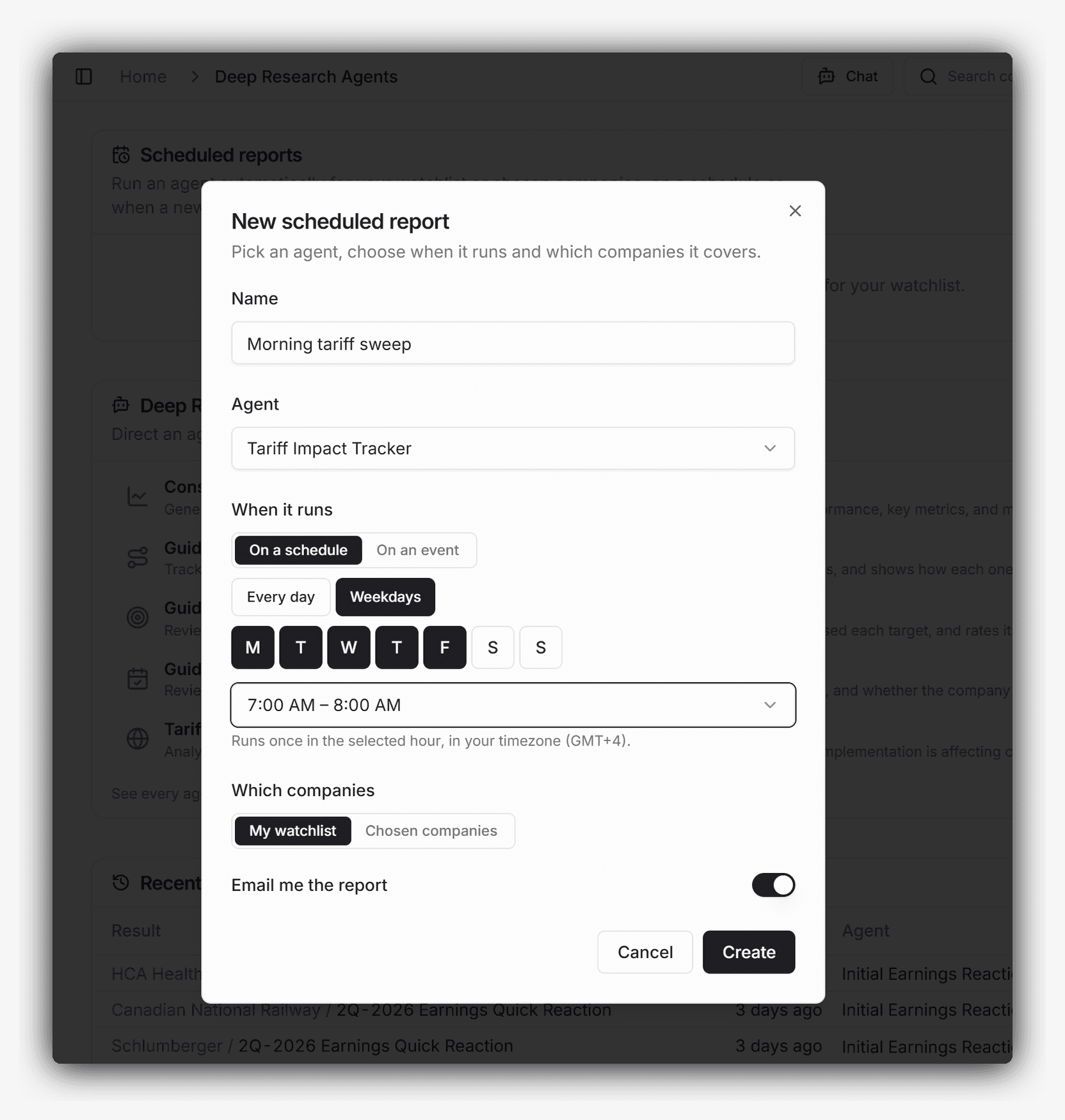 A report set to run the Tariff Impact Tracker across the watchlist every weekday at 7:00 AM, delivered by email.
A report starts one agent run per company in scope. A time-based report covering a 45 company watchlist starts 45 runs each time it triggers. An event-based report starts one run, for the company whose document triggered it.
Scheduled reports are available on the Standard and Pro plans. On the Evaluation plan, agents run manually.
On a Schedule
Choose the days of the week and the hour. Presets cover every day and weekdays, and individual days can be toggled on top of either preset.
Times are in your local timezone. A report runs once inside the selected hour rather than at an exact minute, so a report set to 9:00 AM runs between 9:00 and 10:00.
On an Event
An event-based report runs when a new document arrives for a company in scope. Four events are available, and any combination of them can be selected:
- New filing: Any new filing from a company in scope.
- Earnings press release: First step of the typical earnings release cycle. Triggers when the press release is filed or made available on the company's investor relations page.
- Earnings call transcript: Second step of the cycle. Triggers once the earnings call has concluded and the transcript is available, typically within minutes of the call ending.
- Earnings filing: Third step of the cycle, when the company issues its regulatory filing such as the 10-Q or 10-K filing, or the equivalent in the company's regulatory regime.
Note that not all companies follow this exact three step process. For example, in some jurisdictions the press release contains the full regulatory filing, in which case Marvin Labs treats such a document as an Earnings filing. Furthermore, earnings calls are typically voluntary, and some few companies elect to forego earnings calls.
Which Companies a Report Covers
A report covers either your watchlist or a list of companies you name.
A watchlist report reads your watchlist at the moment it runs, so companies you add to or remove from coverage are picked up automatically with nothing to reconfigure. A named list runs only against the companies you selected.
For event-based reports, this setting decides which companies are eligible to trigger the report rather than how many runs it starts. A watchlist report on the earnings call transcript event triggers once, for whichever watchlist company reported.
Delivery and Management
Every run appears under Recent runs on the Deep Research Agents hub, alongside the runs you started yourself.
"Email me the report" is on by default. Each completed run sends an email with the company and ticker in the subject line, a short teaser from the summary, and a link through to the full report. The full report, with its citations and in-context highlights, opens in the app.
Each report can be paused from the toggle on its row, edited, or deleted. Pausing keeps the configuration and stops the report from running.
Cost
Agents charge Marvin AI Credits in line with the actual token usage of each run, so a short, well-scoped run costs less than a long one that works through many documents.
For the full breakdown of how credits are calculated and consumed across Deep Research Agents and AI Analyst Chat, see Marvin AI Credits.